Live tabletop · early access

otheRRoom

Run your next DnD session now. Just enter the room.

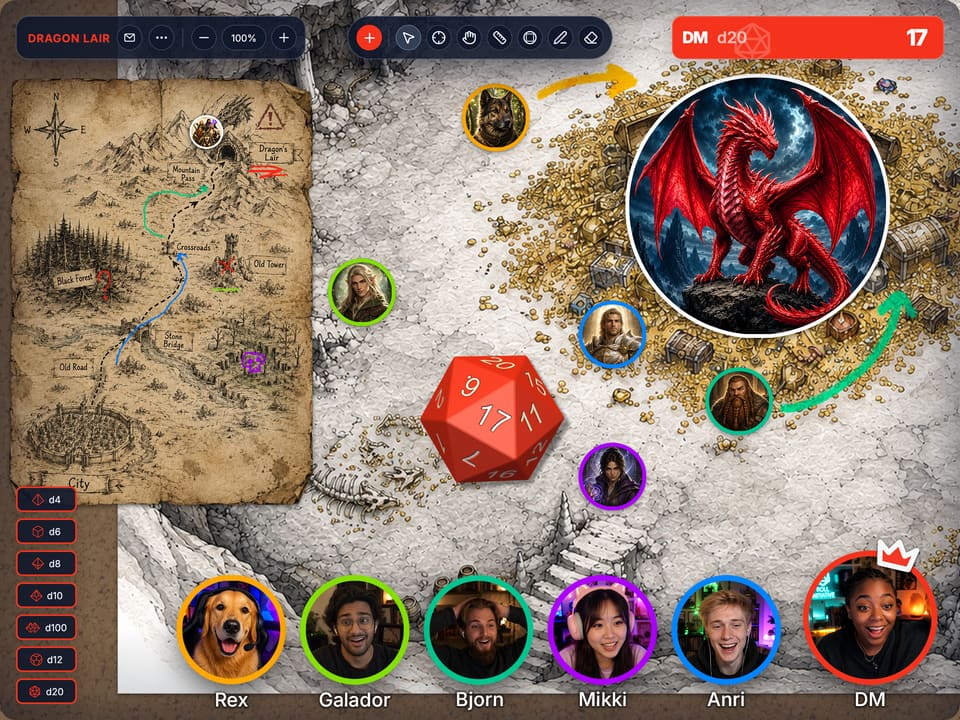
otheRRoom blends a party hub and a session board into one simple space for live tabletop play. Enter the room, drop in a map or any image, roll dice, stream music from YouTube, spawn tokens, and start the adventure.
Start session No download · Free while in beta
Live OtherRoom tabletop session with a dragon cave map, player video bubbles, tokens, dice, and shared controls
Built for fast
live sessions.
Dungeons & Dragons Pathfinder Call of Cthulhu Starfinder Cyberpunk RED Warhammer Fantasy Roleplay Warhammer 40,000 Roleplay: Imperium Maledictum Dark Heresy Rogue Trader
Fate Mothership Lancer Shadowdark Traveller Delta Green RuneQuest Dragonbane
Cypher System 13th Age Mork Borg Fabula Ultima Symbaroum Mutants & Masterminds
// 01  Zero prep needed

From empty room
to live session.

The room already has video, YouTube music, dice, tokens, and board tools. Drop in a map, add a few images, and start playing.

Drop · roll · play

Paste a map. Spawn tokens. Roll a d20. The session is already running.

No accounts for your players. No campaign wizard. No nine‑step setup before anyone gets to roll initiative.

Board first

Drop in a map, sketch, clue, note, or any image your party needs to see.

No distance

See every move on the board and every reaction on camera, as if the whole party is leaning over the same map.

Tools built in

Video, YouTube music, dice, tokens, and board tools stay in the same room.

// 02  No heavy setup

Lighter than a virtual tabletop.
Sharper than a whiteboard.

otheRRoom gives you the freedom of a shared board, shaped for tabletop play. Fewer panels, fewer settings, and fewer extra tools between your party and the adventure.

// the heavy way

Foundry · Roll20 · &c.

Build a whole campaign before your friends can even click join. Modules, sheets, macros, permissions.

// the office way

Miro · FigJam · Zoom share

Sticky notes, retro templates, no dice, no tokens, no music. Wrong space for a goblin ambush.

Faster than a heavy VTT

Create a room and start playing without building a full campaign structure first.

Sharper than a whiteboard

No office clutter. Just the space and tools your table needs for live play.

Built for table speed

The board stays readable while players talk, roll, move, improvise, and push the adventure forward.

// FAQ  Product questions

Questions before
you enter the room

What is otheRRoom?
At its core, otheRRoom is a browser-based tabletop play space for live RPG sessions. A group gets one shared room with a board, maps or images, tokens, dice, music, and built-in video chat for players around the table. The product is built for the moment when everyone wants to start playing quickly, stay oriented, and avoid building a full campaign workspace before the session can begin.
Who is otheRRoom for?
GMs and players who run conversational, improvisational tabletop sessions are the main audience for otheRRoom. It fits one-shots, casual campaigns, remote groups, playtests, and fast prep nights where the board should support the table rather than become the main project. The room works best for groups that value speed, readable shared context, and simple entry.
What game systems does otheRRoom work with?
Right now, otheRRoom is a great fit for Dungeons & Dragons 5e/2024, Pathfinder 1e/2e, Shadowdark, Old-School Essentials, Dungeon Crawl Classics, 13th Age, Level Up: Advanced 5e, Tales of the Valiant, Black Flag, and other 5e-compatible or d20 fantasy games. For those games, otheRRoom provides everything you need for a game, except the game rules themselves. Support for additional systems will be added over time.
How is otheRRoom different from Roll20 or Foundry?
Fast live play is the focus in otheRRoom, rather than deep virtual tabletop configuration. Roll20 and Foundry can support complex sheets, automation, modules, permissions, compendiums, and campaign infrastructure. This room stays lighter: open the space, drop in the scene, use the board, roll dice, and keep the session moving. It is designed for groups that want fewer setup decisions before play starts.
How is otheRRoom different from Miro or FigJam?
Tabletop play shapes otheRRoom more than general collaboration does. Miro and FigJam are excellent whiteboards for planning, workshops, diagrams, and sticky-note flows, but they do not feel like a session table out of the box. The room includes play-specific affordances such as a board, RPG-friendly scene handling, tokens, dice, music, and built-in video chat so the space matches the activity.
Can players join without accounts?
Simple session entry is a core part of otheRRoom, so players should be able to join a room with minimal friction. The intended experience is closer to opening a shared room link than onboarding into a large platform account flow. During the early beta, parts of access, identity, and persistence may still change, but low-friction joining remains a core product goal.
What tools are included in a room?
Each otheRRoom room includes the tools needed for a readable live tabletop session: a shared board, map and image placement, player-facing scene context, tokens, quick distance and range checks, 3D dice, YouTube music, built-in video chat, and simple controls for moving the session forward. The toolset stays focused so the room feels ready for play instead of turning into a broad project-management surface.

Ready when your party is.

Open a room, bring in the scene, and start playing.

Start session
No download · Works in your browser · Free during beta